

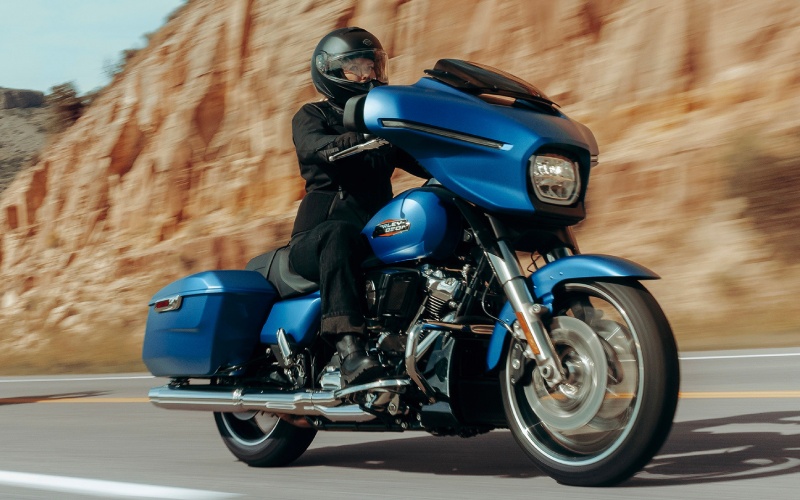
Lancaster Harley-Davidson® - Does Skyline™ OS on the 2026 Harley-Davidson® Street Glide® support wireless Apple CarPlay for Lebanon, PA riders?
Riders who want seamless navigation and audio without juggling multiple gadgets often ask how easily the Street Glide® connects to a smartphone. On the 2026 model, Skyline™ OS consolidates maps, music, and calls into one place—and yes, wireless Apple CarPlay support is available alongside a wired option, making everyday rides around Lebanon, PA more streamlined and less distracting.
What Skyline™ OS Brings To Every Ride
Skyline™ OS is the 12.3-inch full-color TFT system that anchors the Street Glide® cockpit. It centralizes navigation, digital gauges, media, and phone functions while keeping the interface intuitive. With Apple CarPlay supported wirelessly or via USB-C, you can choose the connection that fits your routine. Riders who prefer a minimal cable setup can set it and forget it, while those who want a wired connection for longer days can plug in and charge on the go.
Beyond CarPlay, Bluetooth pairing supports hands-free phone functions and headset integration, and the audio system drives two 5.25-inch fairing speakers with 50 watts per channel. Because the digital gauges live within the display, your speed, RPM, and TPMS alerts stay visible without clutter. This combination of clarity and control is where Skyline™ OS pays off—especially when navigating unfamiliar stretches or managing calls at a stop.
How Wireless Apple CarPlay Works On The Street Glide®
With compatible iPhone devices, CarPlay can connect without a cable after the first setup. Once paired, your familiar Apple Maps, phone, and media apps display cleanly on the TFT. Turn-by-turn prompts are easy to follow, and audio instructions come through the fairing speakers or your paired headset. The larger screen makes multi-lane exit planning and quick street changes more confident, which is a welcome advantage when traffic patterns shift around Lebanon’s main corridors.
Quick Setup Steps For A Smooth First Ride
- Prepare your iPhone: Ensure iOS is current and Bluetooth and Wi-Fi are enabled before approaching the bike.
- Pair Bluetooth: Use Skyline™ OS to initiate pairing, then confirm the code on your iPhone to finalize the connection.
- Enable CarPlay: Approve the CarPlay prompt on your phone, choose wireless or connect a USB-C cable for a wired session.
- Select audio output: Decide whether to route sound to the bike’s fairing speakers or a paired helmet headset.
- Customize screens: Arrange preferred widgets—maps, media, and digital gauges—for quick glances and fewer taps.
After this one-time setup, pairing typically happens automatically when you start the bike with your phone nearby. If you switch between helmets or alternate devices, a quick check of the Bluetooth device list can keep everything in sync.
On-Road Benefits For Lebanon, PA Riders
A wireless CarPlay session means fewer cables and less cockpit clutter, which helps when you are commuting through Lebanon’s weekday traffic or threading out to nearby rolling farm roads. Turn-by-turn directions read cleanly on the big TFT, so route changes are easier to absorb at a glance. Pair that with Vehicle Hold Control for uphill stops and Cornering Enhanced ABS when you are braking into a decreasing-radius turn, and you have a touring platform that mixes convenience with smart, confidence-building support.
Audio clarity matters too. With 50 watts per channel driving two fairing speakers, spoken navigation prompts and calls remain understandable at speed. If you ride with a Bluetooth headset, VOX intercom is available for H-D headsets, and Skyline™ OS accommodates multiple languages and voice recognition so you can keep your hands on the bars when making basic selections at a stop.
Tips For Reliable Wireless Performance
- Keep software current: Periodically update your iPhone and check for available system updates to Skyline™ OS.
- Manage your device list: Remove old helmets or phones you no longer use to prevent pairing conflicts.
- Use wired when preferred: On extra-long days, a USB-C cable provides charging and a robust data link for CarPlay.
- Arrange the cockpit: Place your phone where signal is unobstructed and vibrations are minimized.
- Set audio priorities: Choose whether navigation prompts duck music volume or route entirely to your headset.
Most riders will be satisfied with wireless connectivity day in and day out. If you run multiple devices or ride with a partner who also pairs occasionally, wired mode remains a quick, predictable backup that preserves your screen layout and app preferences.
Frequently Asked Questions:
Do I need a specific helmet headset for voice functions?
Skyline™ OS supports Bluetooth headsets broadly, and VOX is available for H-D headsets. For the most seamless experience, choose a headset known to pair reliably with Harley-Davidson® touring models.
Is Apple CarPlay the only navigation option?
No. You can also use the built-in navigation within Skyline™ OS. Many riders prefer CarPlay for app familiarity, while others run the native system for its tight integration and simplicity.
Will wireless CarPlay drain my phone battery quickly?
Wireless connections use more power than passive storage, but real-world impact varies by screen brightness and app usage. If you plan an all-day ride, a wired USB-C connection offers charging and stable data.
Does the system support Android devices?
Skyline™ OS supports Bluetooth pairing for phone and media with a broad range of Android phones. For riders who prefer mirrored apps, check for the latest compatibility notes as features can evolve over time.
When you want guidance that is local, practical, and matched to your riding style, Lancaster Harley-Davidson® can walk you through pairing, layout customization, and audio choices—serving Harrisburg, York, and Lebanon with setup tips that work on your daily roads and weekend escapes alike.