

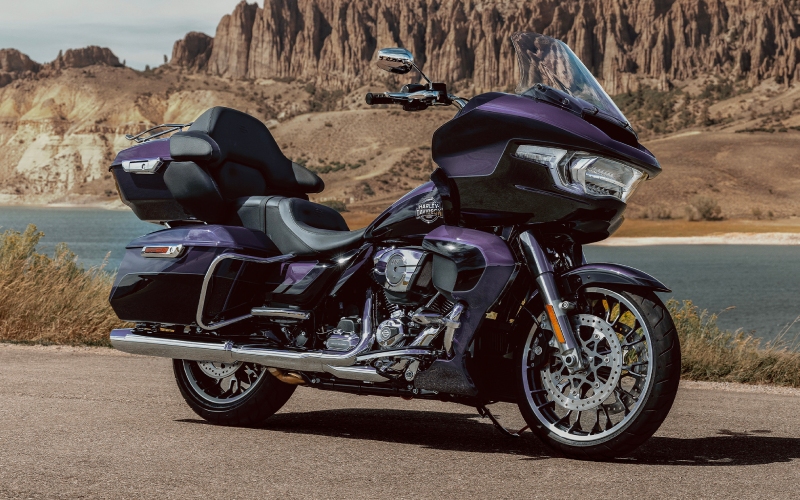
Lancaster Harley-Davidson® - Does Skyline™ OS on the 2026 Harley-Davidson® Road Glide® Limited make navigation and audio simpler around Harrisburg, PA?
Riders who spend long days linking backroads and highways want navigation and audio that just work, especially when traffic and weather shift without warning. On the 2026 Harley-Davidson® Road Glide® Limited, Skyline™ OS turns the cockpit into a clean, capable hub, unifying mapping, calls, and music in a way that feels genuinely touring-first around Harrisburg, PA and the surrounding river valley.
Below, we take a practical look at how Skyline™ OS helps you move through changing routes with fewer taps and more clarity, and we explain the small setup choices that make a big difference once you are in motion.
What Skyline™ OS Brings to Everyday Touring
Skyline™ OS centers on a bright, 12.3 in. full-color TFT display engineered for easy viewing and simplified controls. Embedded Navigation is onboard, so guidance stays available even when your phone signal dips east of the river or along tree-lined two-lanes. The interface supports Bluetooth for phone and media and integrates Apple CarPlay (wireless or wired) to extend your familiar app ecosystem into the cockpit. When paired with the four-speaker, 200-watt audio system, directions and playlists remain clear at speed — a real asset on wide-open stretches of US-322 and during faster merges where you need to keep your eyes ahead.
Voice recognition (phone dependent) and multi-language support let you handle quick actions hands-free, and a USB-C port keeps your device topped off. Importantly, the system’s layout is organized around intuitive tiles and menus that remain legible in sunlight, so you spend less time hunting through screens and more time reading the road.
How to Set Up Skyline™ OS for Fewer Distractions
Dial-in takes a few minutes in the driveway and pays off immediately once you roll. Pair your phone via Bluetooth, confirm Apple CarPlay access if you plan to use it, and preload a few frequently used destinations. If you commute between neighborhoods, work, and scenic overlooks west of the city, saving those points makes route selection a one-touch action. Adjust screen brightness for the conditions you ride most — darker visor, bright morning sun, or dusk — then set your audio balance and EQ so spoken directions and music come through clearly at your normal cruising speed.
Finally, learn the quick-access gestures and buttons for nav rerouting and audio volume. Those small muscle-memory moves reduce the time your hand is away from the grip when traffic on Front Street compresses or you are navigating bridge crossings.
Why Embedded Navigation Still Matters
There are days when cellular data is perfect and others when it is not. Embedded Navigation gives you a safety net for mapping in spots where service fades — think wooded stretches, rolling farmland, or gaps between boroughs. It is not about replacing your preferred apps; it is about ensuring reliable guidance during the moments you need it most, without forcing you to stop and troubleshoot.
Because maps live on the bike, Skyline™ OS can provide consistent route visuals and prompts while Apple CarPlay remains available for your playlists, podcasts, and messaging. It is a best-of-both-worlds approach that suits riders who value redundancy on longer trips.
Complementary Touring Features You Will Notice
Skyline™ OS is part of a larger package tuned for clarity and comfort. The sharknose fairing and NEW Tall Wind Screen shape smoother air at helmet level, which helps you hear audio prompts and reduces fatigue on I-81 runs. LED lighting aids visibility at dusk when you are lining up an exit or scanning for cross traffic. And the redesigned heated seats with on-seat controls keep you and your passenger settled as temperatures swing west of the Susquehanna.
Underneath, tuned SHOWA® suspension with remote-adjust rear preload and the low, 27.5 in. laden seat height contribute to a planted feel at parking-lot speeds and a calm chassis on long sweepers. Cornering Rider Safety Enhancements (C-ABS, C-ELB, C-TCS, and C-DSCS), plus VHC and TPMS, work in the background to support composure if traction or grade changes unexpectedly.
Real-World Use Cases on Local Roads
Picture a Saturday loop that strings together Paxtang, Fort Hunter, and a lunch stop near Linglestown. You preload a few waypoints, press go, and let Embedded Navigation handle re-routes when a detour pops up. Apple CarPlay runs your podcast, and the four-speaker system keeps it clear even at highway pace. If a rain cell moves in, you adjust seat warmth on the fly using the on-seat controls, and the wind screen keeps the cockpit calmer so directions remain easy to hear.
On the return leg, you switch to a playlist and glance down at the TPMS readout before picking up a stretch of 322. That kind of quiet, seamless utility is where Skyline™ OS shines — not by adding complexity, but by helping you stay focused on the ride.
Frequently Asked Questions:
Do I need an iPhone to use Skyline™ OS effectively?
No. Skyline™ OS is fully functional on its own, with Embedded Navigation, Bluetooth connectivity, AM/FM, and a USB-C input. Apple CarPlay (wireless or wired) is an added convenience if you want to integrate your iPhone apps, messages, and media. Many riders use a combination — Embedded Navigation for routing reliability and CarPlay for familiar audio apps.
How visible is the 12.3 in. TFT in sunlight?
The display is designed for daytime readability and responds well to changes in ambient light. You can adjust brightness to match your visor tint and typical riding conditions. It remains clear in bright conditions common on open stretches around Harrisburg, PA, helping you read maps and audio prompts at a glance.
Can passengers hear the audio clearly?
Yes. With two 6.5 in. fairing speakers and two 6.5 in. Tour-Pak® speakers driven by 200 watts, audio stays audible at speed. For intercom and conversation, rider and passenger headsets are available, and VOX is supported for H-D headsets. That keeps communications crisp without shouting over wind.
Does Skyline™ OS work with gloves?
The interface and controls are engineered for gloved operation. Still, it is smart to set key destinations and audio preferences before you ride and to learn quick-access controls so you can make small adjustments with minimal distraction.
When you are ready to see how Skyline™ OS fits your day-to-day rides, Lancaster Harley-Davidson® is here to help you get oriented to the interface and talk through accessories that support your routes. We are serving Harrisburg, York, and Lebanon with rider-focused guidance that keeps the technology simple and your attention where it belongs — on the road ahead.